I love the Google AdWords Keyword Tool. I use it all the time and I demo it a lot when speaking at events. But I have no idea what the URL is. When I want to use it, I just do whatever else does whenever they want to go to any site on the web. I do a Google search for it. Specifically, I type [google adwords keyword tool] into Google and click on the first result.
Until today.
Now when I do that search, the tool is nowhere to be found.
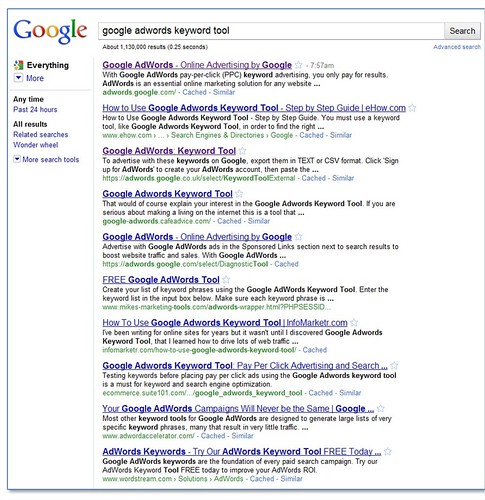
Instead, I find the Google AdWords landing page, a bunch of articles on other sites about the keyword tool, and the UK version of the tool. Huh. What’s up with that? (I don’t even see a paid search ad for it.)
Google recently completely revamped the tool and as part of that, changed the URL. The old URL was https://adwords.google.com/select/KeywordTool. Now, when you (or Googlebot, if you are not you, but instead, a search engine webcrawler looking to update your index) access that URL, you get a 302 redirect to https://adwords.google.com/o/Targeting/Explorer?__u=5701132992&__c=8003242272&stylePrefOverride=2#search.none!ideaType=KEYWORD&requestType=IDEAS. And a captcha.
When I look for that URL in Google, I see it’s not indexed, although at least I see a paid search ad for the tool.
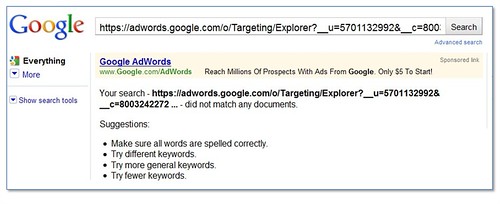
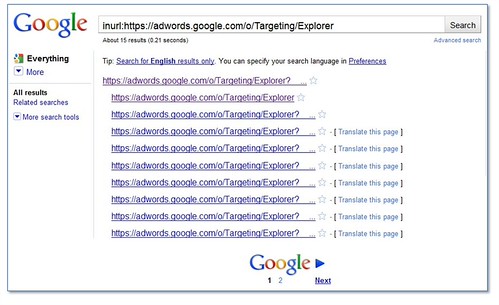
Of course, that URL doesn’t show up in part because it’s not a permanent URL. If I try to access inurl:https://adwords.google.com/o/Targeting/Explorer, I also get the keyword tool, via a set of redirect that leads to this URL: https://adwords.google.com/o/Targeting/Explorer?&stylePrefOverride=2&__u=5701132992&__c=8003242272#search.none!ideaType=KEYWORD&requestType=IDEAS.
Which is actually the same URL with the parameters in a different order. Although things don’t look much better in the Google index when I search for any URL that begins with https://adwords.google.com/o/Targeting/Explorer.
Let’s look a little more closely at those redirects. The source code of https://adwords.google.com/o/Targeting/Explorer looks like this:
<script type="text/javascript" language="javascript">
var jsRedirect = true;
var url = "/select/Login?aw3=true&dst=%2Fo%2FTargeting%2FExplorer&frag=search.none%21ideaType%3DKEYWORD%26requestType%3DIDEAS";
window.location.assign(url);
</script> </body> </html>
Which then leads to this (HTTP response edited to show the vital components for this example):
https://adwords.google.com/select/Login?aw3=true&dst=%2Fo%2FTargeting%2FExplorer&frag=search.none%21ideaType%3DKEYWORD%26requestType%3DIDEAS
HTTP/1.1 302 Moved Temporarily
----------------------------------------------------------
https://adwords.google.com/um/StartNewLogin?aw3=true&dst=%2Fo%2FTargeting%2FExplorer&frag=search.none%21ideaType%3DKEYWORD%26requestType%3DIDEAS
HTTP/1.1 302 Moved Temporarily
----------------------------------------------------------
https://www.google.com/accounts/ServiceLogin?service=adwords&hl=en_US<mpl=regionale&passive=true&ifr=false&alwf=true&continue=https%3A%2F%2Fadwords.google.com%2Fum%2Fgaiaauth%3Fapt%3DNone%26ugl%3Dtrue
HTTP/1.1 302 Moved Temporarily
----------------------------------------------------------
https://adwords.google.com/um/gaiaauth?apt=None&ugl=true&pli=1&auth=DQAAALUAAAAMl8-Jos-ywfDoe9g9erkG4klYT-fzYde8k9MEQMmOkonqCalB_LbFISNUgDOMGnoAZkaofqL2ZGwAbwAwV8-rQ6dGM9XnEjgrwUJsc9l_S-0NFsPz0om6ExrJSZf8lQnKJkASgaEqE7SGWbCpcMYd_qihOdzJVvGH0P7_jopql3FQJ5vGT6PuazK260Z2hXVAxy3eyEICPHqe7R9LvLrjbM1fHZLgquTrd6dMYIN64iMDKvShFg_rXfjonOCj6jo
HTTP/1.1 302 Moved Temporarily
----------------------------------------------------------
https://adwords.google.com/um/gaiaauth?apt=None&ugl=true&pli=1
HTTP/1.1 302 Moved Temporarily
----------------------------------------------------------
https://adwords.google.com/select/gaiaauth?__u=5701132992&__c=8003242272&stylePrefOverride=2&30Login=true&url=%2Fo%2FTargeting%2FExplorer#search.none!ideaType=KEYWORD&requestType=IDEAS
HTTP/1.1 302 Moved Temporarily
----------------------------------------------------------
https://adwords.google.com/o/Targeting/Explorer?&stylePrefOverride=2&__u=5701132992&__c=8003242272#search.none!ideaType=KEYWORD&requestType=IDEAS
HTTP/1.1 200 OK
Perhaps Google has a few things to add to their SEO report card:
- If possible, keep the URL the same when you change content.
- If that’s not possible, don’t use a JavaScript redirect to move the URL.
- Also don’t use a 302. Use a 301.
- Don’t redirect multiple times.
- If that’s not possible, keep the number of redirects under 5.
- Googlebot can’t fill out a captcha.
- If you don’t show up at all in organic search, a paid search ad for the name of your product can be helpful.
Confidential to the Google AdWords Keyword Tool team: If you’re not sure if your URLs are being crawled, check the crawl errors section of Google Webmaster Tools. It’s got this great “URLs not followed” report that may provide some helpful information.
Confidential to everyone else: You can find the Google AdWords Keyword Tool here.